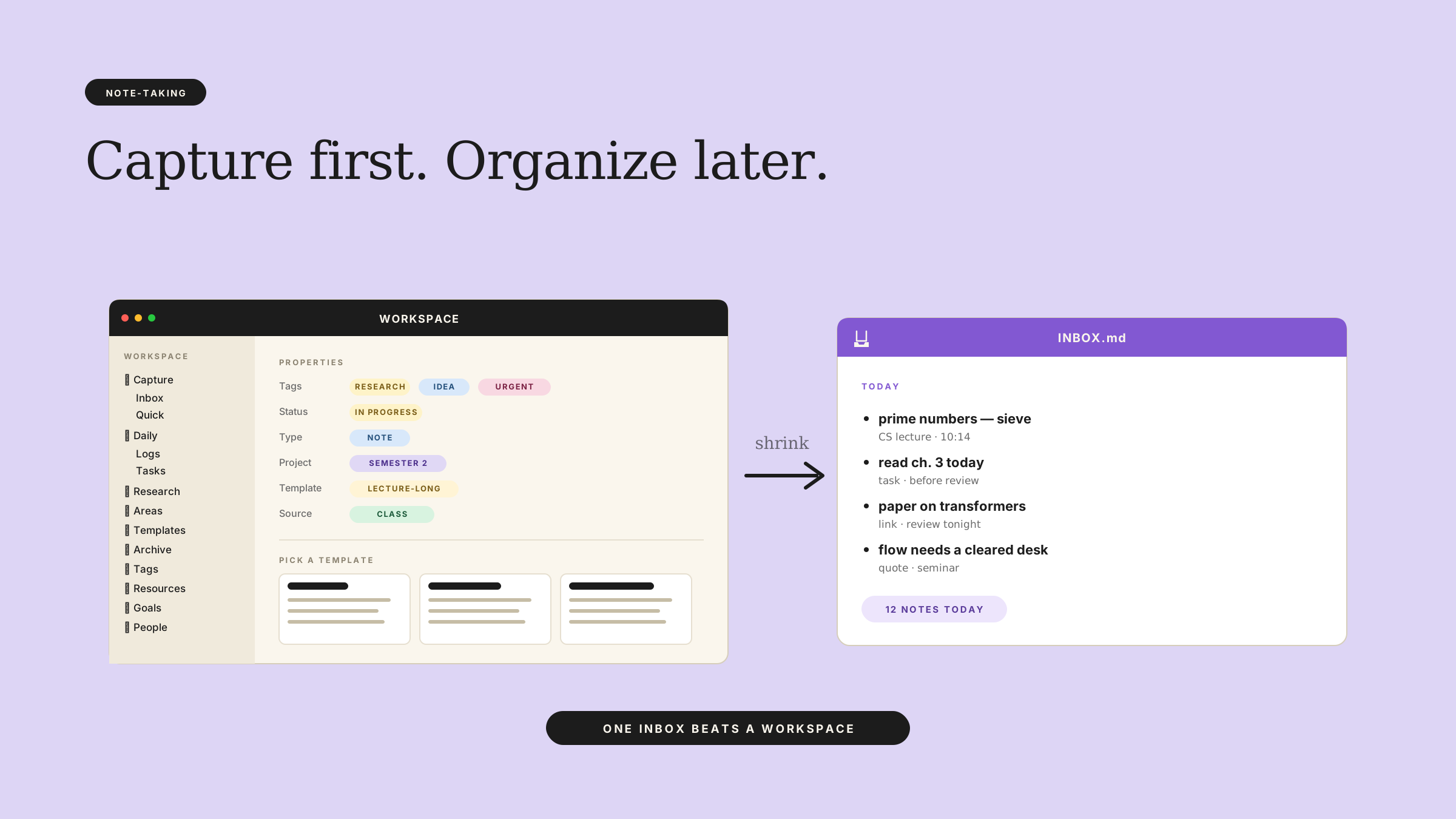
Why Notion feels slow even when it works
If you open Notion to capture one thought and spend seven minutes deciding where it should live, the tool is already costing you. That moment feels small, but it breaks your pace, and once your pace breaks, note-taking starts to feel like a chore.
That’s why “notion too slow note taking” shows up as a real complaint, not just a gripe. The problem usually isn’t raw app speed. It’s the number of decisions Notion asks for before you can write anything down.
Why Notion feels slow even when it works
Notion gives you a lot of room to build a system. That sounds nice until you need to capture a quote, a class idea, or a research note in ten seconds.
A fast note tool gets out of the way. Notion often makes you choose a page, a database, a property set, a template, and maybe a tag before the note exists. Even if each step only takes a few clicks, the mental drag adds up.
That’s what people mean by “why notion feels slow.” They are not always talking about page load time. They are talking about friction.
A friction-heavy workflow does three things:
- It makes capture feel like setup.
- It turns small notes into mini projects.
- It makes you hesitate, which is the fastest way to lose a thought.
If you’re a student or researcher, that hesitation matters more than perfect organization. A messy note you actually wrote is better than a perfect system you avoided.
The hidden cost of over-customizing notes
The deepest trap in a notion note-taking workflow is customization. A clean dashboard looks productive, so you keep building it. But every new property, database relation, and template adds another choice before you can type.
That’s how “how to make notion faster for note taking” gets answered with tricks that don’t fix the real issue. You can hide buttons, trim views, or clone templates, but if the workflow still asks too much of you, you’ll still slow down.
The cost isn’t just lost minutes. It’s cognitive load. Your brain now has to remember where notes go, which template to use, and which type of note this one counts as.
For personal knowledge work, that’s a bad trade. You want one rule: capture first, organize later.
A minimum setup for fast capture
If notion slow note taking is the symptom, the fix is usually smaller than people want. Start with the least fancy setup that still lets you find things later.
1. Use one capture place
Pick one inbox page or one notes database. Not three. One.
Every note starts there, even if it later moves into a project page, course page, or research area. This cuts the first decision to near zero.
2. Keep the note format plain
Use the same simple structure every time:
- what the note is about
- the source or class where it came from
- the actual idea, quote, or task
- one next step, if needed
That’s enough for most notes. You do not need a different template for every use case.
3. Delay tags until review
Tags feel tidy, but they slow capture. If you want speed, add tags only when you review notes later.
This matters a lot for students and researchers, because many notes start as scraps. A line from a lecture. A paragraph from a paper. A reminder to look something up. None of those need a full taxonomy in the moment.
4. Separate capture from cleanup
Your note-taking workflow should have two modes:
- capture mode: write fast, do not polish
- cleanup mode: organize, link, tag, archive
If you mix them, every note becomes an editing task. That’s where the drag comes from.
When to stop optimizing and start using it
There’s a point where “how to make notion faster for note taking” turns into procrastination wearing a productivity costume.
You know you’ve crossed it when you spend more time designing the system than collecting notes. You also know it’s happening when you keep changing views because you hope the next layout will finally feel natural.
Stop there. Pick a setup and live with it for two weeks.
The test is simple:
- Can you open the page and type in under 15 seconds?
- Can you find last week’s notes without rebuilding the database?
- Can you trust yourself to return later and clean things up?
If the answer is yes, the system is good enough. If the answer is no, the issue might not be your discipline. It might be the tool shape.
How to know if Notion is the wrong tool for you
Notion is fine for some people. It’s especially fine if you like structure and don’t mind designing it. But if note-taking needs to stay invisible, Notion may be too much.
It may be the wrong tool if:
- you capture notes many times a day
- you hate choosing templates
- you want one fast inbox, not a whole workspace project
- you lose ideas because the note setup takes too long
That doesn’t mean Notion is bad. It means your use case values speed over structure.
And that’s the key distinction. A tool can be powerful and still be a poor fit for fast notes.
If you keep asking why Notion feels slow, look at the workflow, not just the app. Most of the pain comes from making a note system do too much before the note even exists.
For a lighter setup, use Draft and Arc to turn scattered notes into a simpler, faster study workflow.